If you’re into decentralized finance (DeFi), chances are you’re using multiple blockchains and multiple addresses. And, the more you spread out, the harder it becomes to keep track of your portfolio. Although wallets are constantly improving, the functionalities they offer soon reach their limits in this respect. The tools we’re going to introduce to you in this article will help you manage and track your wallet more easily. We’ll take you through the possibilities they offer, and guide you step-by-step through their use.
Estimated reading time : 10 minutes
The links contained in this article may be affiliate links. The site is likely to receive remuneration when an action is carried out from these links. Thank you for your support!
Before going any further, we must point out that you need a portfolio non-custodial to be able to interact with the proposed tools. If you don’t have one yet, you can consult our guide to help you choose. For this article, we will use Metamaskbut the procedure is identical with other wallets.
In addition, the tools proposed here (except Nansen portefolio) are usable only with blockchains compatible with the Ethereum Virtual Machine (EVM). These are blockchains that can execute smart contracts using the same language and logic as Ethereum.
You can interact with these blockchains using the same address and the same EVM wallet. There are several hundred of them, including :
- Binance Chain
- Avalanche
- Polygon
- Arbitrum
- Optimism
- Metis
- Zksync Era
- …
If you use Solana, MultiversX or other ecosystems, most of the tools presented here will unfortunately be useless to you.
Chainlist: add the blockchains you need to your portfolio
To interact with a compatible EVM blockchain, you need to provide your wallet with certain information. You need to add Remote Procedure Call (RPC) or « remote procedure call ». Without going into the technical details, this is a set of protocols enabling your wallet and the blockchain to communicate.
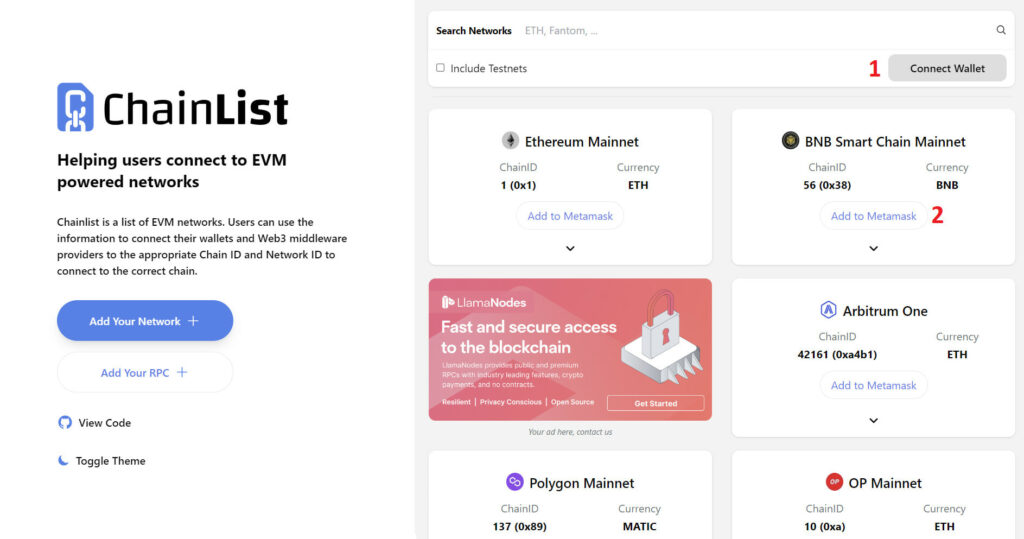
A list of existing RPCs for EVM-compatible blockchains can be found at Chainlist.
Adding an RPC to your portfolio takes just a few clicks. Start by connecting your portfolio using the icon at top right (1). Choose the RPC you’re interested in, then click on « Add to Metamask » (2).

Then validate what’s displayed on your wallet and you’re done.
For a single blockchain, you may be able to choose between several RPC URLs. They do not all have the same characteristics (reliability, security, speed, privacy…). Chainlist offers you a ranking based on various criteria.
You can make them appear by clicking on the little arrow (3), then add the one of your choice by clicking on « Connect Wallet » (4).

If you don’t know which entities offer RPC, choose those at the top of the ranking for greater security.
Nansen portefolio and DeBank: follow the evolution of your capital and consult your transactions
Tools overview
These are two portfolio trackerswhich offer much the same functionality and interface.
They are, however complementarybecause they do not all support the same blockchains and protocols (49 blockchains and 800 protocols for DeBank versus 45 blockchains and around 400 protocols for Nansen portfolio).

L’Nansen’s advantage is that it can handle EVM-compatible blockchains (Cosmos ecosystem, Aptos…), while that of DeBank is to work with more protocols. DeBank also offers track portfolios that don’t belong to you and a messaging system.
When you enter an address in the search bar, the 2 trackers scan the blockchains and protocols they support and display all the tokens you own (and their value in US dollars).
If you have tokens on blockchains or protocols other than those supported, they are not detected and therefore do not appear in the list displayed. It may therefore be worthwhile touse DeBank and Nansen in parallelfor a more comprehensive view of your funds.
In the screenshots that follow, we’ll introduce you to Nansen portefolio. DeBank works in the same way, and the more curious among you can go to consult this article which presents the tool in detail.
>> Prefer to keep your bitcoins safe? Choose a Ledger wallet (commercial link) >>;
Using Nansen Portfolio
The dashboard
Start by visiting theYour bitcoins are very valuable and deserve maximum protection! For peace of mind, equip yourself with a Ledger secure hardware wallet, there’s something for everyone. Your security is priceless (commercial link).ur home page and enter the address you wish to consult (1). Some information will only be accessible to you if you prove that you are the owner of the address consulted by connecting your wallet.
Your dashboard will then appear.

You will find among others :
- the total value of your portfolio which takes into account rewards waiting to be claimed.
- the list of all tokens on the address you entered. The little logo at top right tells you which blockchains they are on.
- the list of all tokens which are used on DeFi protocols.
If you own several addresses and you want them group to consult them at the same time. To do this, go to the « Portfolio » tab (2), click on the pen (3) then on « Add Wallet » and enter your various addresses.

You’ll see the tokens for all your addresses when you return to the dashboard.
You can also add your Binance account using an API key.
Transaction tracking
The » Transactions The « Transactions » menu (4) displays the transactions that have taken place on your wallet. You can display those concerning tokens and/or NFTs (5), and hide or not scams detected by Nansen (6).

By clicking on a transaction, you will automatically be sent to the official explorer of the blockchain on which it took place. This will give you access to any additional information you may need.
Portfolio composition and history
With the » Analytics « (7), you will have access to more details on the your portfolio composition and on theperformance history.

De.fi: consult and revoke authorizations
In DeFi, you are often required to sign authorizations with your wallet to enable applications to interact with your funds or data.
They can be permanent or limited in timeand can provide access to sensitive functions such as the transfer of your assets. It is therefore important to regularly review the authorizations you have granted, and to revoke them if they are no longer required, or if they present a security risk. Indeed, if a DeFi protocol is hacked, it could abuse your authorizations and cause irreversible losses.
The application we recommend for consulting and revoking authorizations signed with your wallet is De.fi.
To use it, connect your wallet using the « Connect wallet » icons (1-2).

In the right-hand menu, select « Shield » (3). You will then see a score representing « your portfolio’s « state of health (4) (the closer to 100%, the safer your funds).

By checking the » Advanced mode « (5), you can consult the list of tall current authorizations, classified according to the danger they represent.
For deleteclick on the » Revoke Click on the « Revoke » link on the right (6), then validate on your wallet.
To conclude
The tools we have selected here are not the only ones on the market to perform the functions presented. At the time of writing, they appear to be among the best in their category.
However, in the world of web3 and DeFi, things change very quickly. So don’t hesitate to consult and test their competitors, such as Alchemy, RevokeCashor Zerion.
Keep up to date with the latest news by logging on often to the website of your favorite newspaper.
If you’re looking for DeFi tools that offer other possibilities, take a look at our first articles in this series. We look forward to seeing you next week to explore one of them in greater depth.
Your bitcoins are very valuable and deserve maximum protection! For peace of mind, equip yourself with a Ledger secure hardware wallet, there’s something for everyone. Your security is priceless (commercial link).